Chrome extension
A side panel next to the page you are reading. Capture the current tab, use the right-click menu, or press your own keyboard shortcut. Paste a mixed list and get a row for each item.
For people who keep a reference spreadsheet
Give YourStasis a URL, a block of rich text, a file, or the tab you are on. It returns one reviewed, editable row — resource name, URL, description, notes, type, expertise, freemium, pricing, use cases, and region — that pastes straight into the Google Sheet you already keep, in the column order you already use.
Nothing is copied or exported until you have looked at it. Every field is editable first, and low-confidence values are flagged rather than guessed.
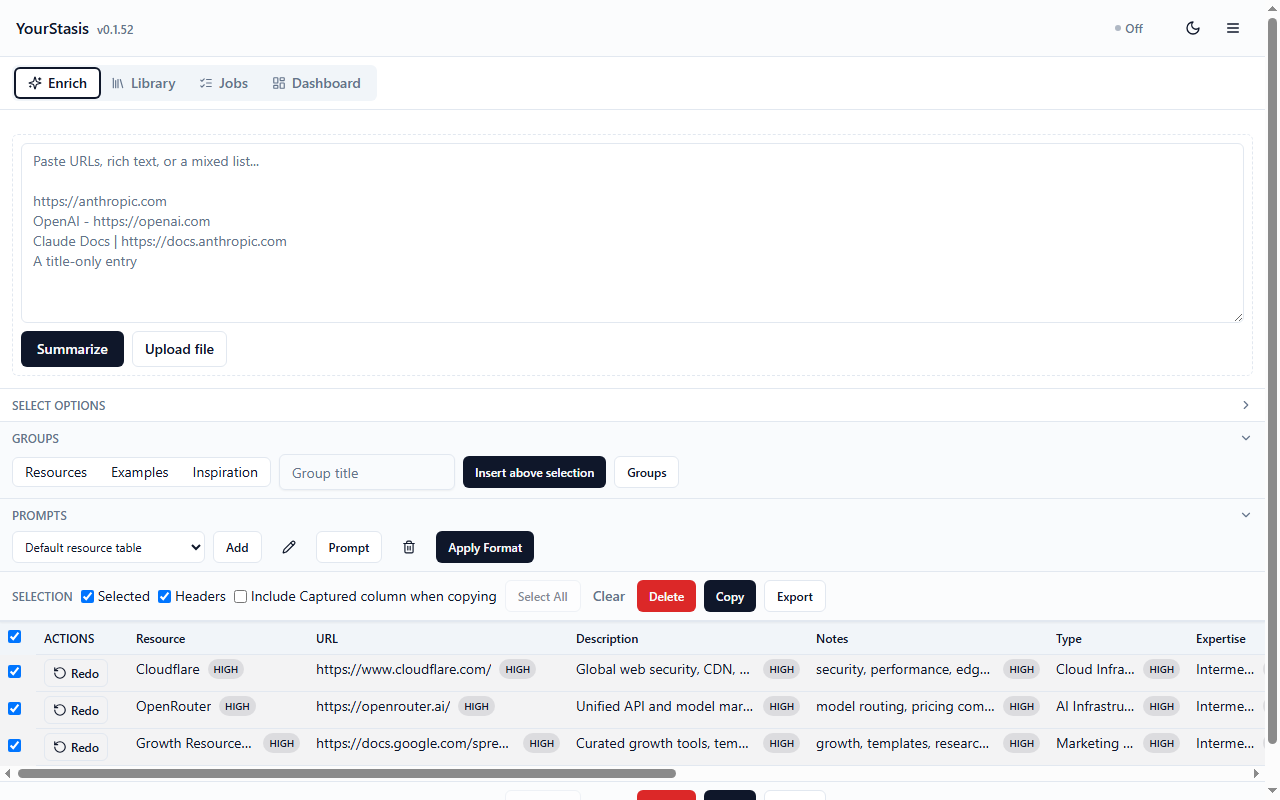
The output
The row is the product. A URL is read, classified, and filled in as the eleven columns your sheet already has — not as a paragraph you then have to take apart.
Three ways in
A side panel next to the page you are reading. Capture the current tab, use the right-click menu, or press your own keyboard shortcut. Paste a mixed list and get a row for each item.
The full workspace, with the paste area, file upload, and the editable preview grid. The same account and the same rows as the extension.
Share a link from any app on your phone and it lands in your library, enriched, for you to review later at a keyboard.
Your data, your provider
You can switch later. The difference that matters is where the model runs and whose key pays for it.
Sign in and start. Enrichment runs on our hosted API, with usage and logs visible in the app.
Use your own OpenAI-, OpenRouter-, or Anthropic-compatible key. The key stays on your machine and calls are billed to you.
Point it at an OpenAI-compatible local model and your content is never sent to a model provider. Your finished rows still sync to your own account so they appear on your other devices — you can turn that off in Account.
What it will not do
Pages are read after an explicit action — a capture click, a context-menu command, or your shortcut. There is no ambient browsing history collection.
Copying to the clipboard and exporting to Google Sheets or Docs are separate, explicit actions. You review the row first.
With permission it can read the Doc or Sheet you have open for context and write rows back. Declining it never blocks the workflow.
Unknown fields are left blank or flagged as low confidence rather than filled with a plausible guess.
Download the beta, load it as an unpacked extension, and enrich something you were going to add to your sheet anyway.